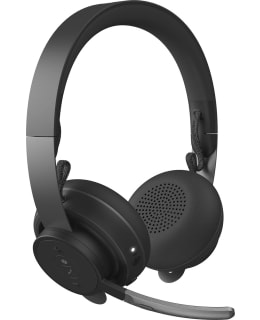
A Bluetooth headset for the open office: it features exceptional sound quality, mute microphone by turning the arm and Qi wireless charging.
Manage your acoustic environment with the Zone Wireless Bluetooth headset microphone for improved communication, collaboration and focus in noisy workplaces. Zone Wireless Plus allows you to connect up to six Logitech Unifying wireless peripherals through a single receiver.
Concentrating in the home office can be tricky these days. The Zone Wireless headset's feedback technology reduces background noise, helps you focus on the task at hand and improves productivity. It creates an island of calm amidst distracting noise. The workspace remains unchanged, but you can control your own audio experience.
Indulge yourself with immersive sound while listening to music. Logitech audio engineers have been fine-tuning headphone audio for decades, and the results are clearly audible when you listen to your favourite music with the Zone Wireless headset. The noise-cancelling microphone is ideal for calls and video conferencing, isolating sound from ambient noise for clearer conversations. Plus, you can adjust the volume of your own voice to just the right level with the side volume control.
You can use the Zone Wireless Plus hearing microphone with up to six other Logitech Unifying wireless products via the same USB receiver. The receiver plugs into your computer's USB-A port and provides reliable connectivity for mice and keyboards with a 10-meter range and a 30-meter range for the headset microphone. Because the receiver never needs to be disconnected, it never gets lost. No more having to choose between headset, mouse or other peripherals - they can now all be used at the same time.
Works with the most common phone applications on almost all platforms and operating systems. Enterprise certifications include Microsoft Teams, Google Meet and Google Voice, Zoom, Tencent Meeting and works with other popular apps such as BlueJeans, GoTo Meeting and RingCentral for compatibility and seamless integration in the workplace.
Open the Logi Tune mobile app on your smartphone or Tune Desktop on your PC to conveniently deploy, manage and customise your Zone Wireless headset. With stylish, easy-to-use controls, you can control attenuation, view charge status, adjust the side sound and edit the five-band equalization (or select one of your custom presets). Keep your headset microphone up to date by downloading the latest software from your mobile or computer app.